> ## Documentation Index
> Fetch the complete documentation index at: https://projectdiscovery-subfinder-reference-blog.mintlify.site/llms.txt
> Use this file to discover all available pages before exploring further.
# Introducing the Nuclei Results Dashboard
> Review your Nuclei results in an integrated dashboard through ProjectDiscovery Cloud Platform
## Nuclei Result Dashboard
Nuclei now allows seamless integration with the ProjectDiscovery Cloud Platform to simplify the visualization of Nuclei results and generate swift reports. This highly requested feature from the community enables easier handling of scan results with minimal effort.
Follow the steps below to set up your PDCP Result Dashboard:
1. Visit [https://cloud.projectdiscovery.io](https://cloud.projectdiscovery.io) to create free PDCP API key.
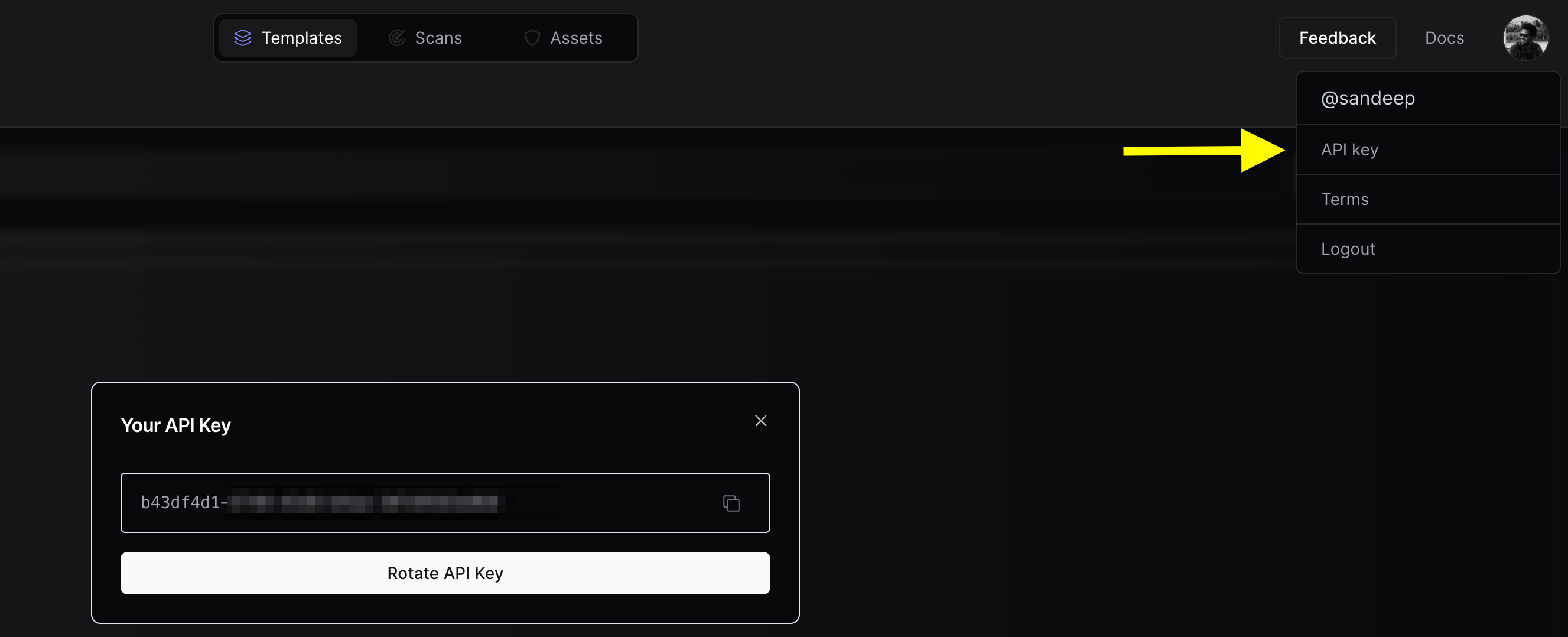 2. Use the `nuclei -auth` command, enter your API key when prompted.
3. To perform a scan and upload the results straight to the cloud, use the `-cloud-upload` option while running a nuclei scan.
An example command might look like:
```bash
nuclei -target http://honey.scanme.sh -cloud-upload
```
And the output would be:
```console
__ _
____ __ _______/ /__ (_)
/ __ \/ / / / ___/ / _ \/ /
/ / / / /_/ / /__/ / __/ /
/_/ /_/\__,_/\___/_/\___/_/ v3.1.0
projectdiscovery.io
[INF] Current nuclei version: v3.1.0 (latest)
[INF] Current nuclei-templates version: v9.6.9 (latest)
[INF] To view results on cloud dashboard, visit https://cloud.projectdiscovery.io/scans upon scan completion.
[INF] New templates added in latest release: 73
[INF] Templates loaded for current scan: 71
[INF] Executing 71 signed templates from projectdiscovery/nuclei-templates
[INF] Targets loaded for current scan: 1
[INF] Using Interactsh Server: oast.live
[CVE-2017-9506] [http] [medium] http://honey.scanme.sh/plugins/servlet/oauth/users/icon-uri?consumerUri=http://clk37fcdiuf176s376hgjzo3xsoq5bdad.oast.live
[CVE-2019-9978] [http] [medium] http://honey.scanme.sh/wp-admin/admin-post.php?swp_debug=load_options&swp_url=http://clk37fcdiuf176s376hgyk9ppdqe9a83z.oast.live
[CVE-2019-8451] [http] [medium] http://honey.scanme.sh/plugins/servlet/gadgets/makeRequest
[CVE-2015-8813] [http] [high] http://honey.scanme.sh/Umbraco/feedproxy.aspx?url=http://clk37fcdiuf176s376hgj885caqoc713k.oast.live
[CVE-2020-24148] [http] [critical] http://honey.scanme.sh/wp-admin/admin-ajax.php?action=moove_read_xml
[CVE-2020-5775] [http] [medium] http://honey.scanme.sh/external_content/retrieve/oembed?endpoint=http://clk37fcdiuf176s376hgyyxa48ih7jep5.oast.live&url=foo
[CVE-2020-7796] [http] [critical] http://honey.scanme.sh/zimlet/com_zimbra_webex/httpPost.jsp?companyId=http://clk37fcdiuf176s376hgi9b8sd33se5sr.oast.live%23
[CVE-2017-18638] [http] [high] http://honey.scanme.sh/composer/send_email?to=hVsp@XOvw&url=http://clk37fcdiuf176s376hgyf8y81i9oju3e.oast.live
[CVE-2018-15517] [http] [high] http://honey.scanme.sh/index.php/System/MailConnect/host/clk37fcdiuf176s376hgi5j3fsht3dchj.oast.live/port/80/secure/
[CVE-2021-45967] [http] [critical] http://honey.scanme.sh/services/pluginscript/..;/..;/..;/getFavicon?host=clk37fcdiuf176s376hgh1y3xjzb3yjpy.oast.live
[CVE-2021-26855] [http] [critical] http://honey.scanme.sh/owa/auth/x.js
[INF] Scan results uploaded! View them at https://cloud.projectdiscovery.io/scans/clk37krsr14s73afc3ag
```
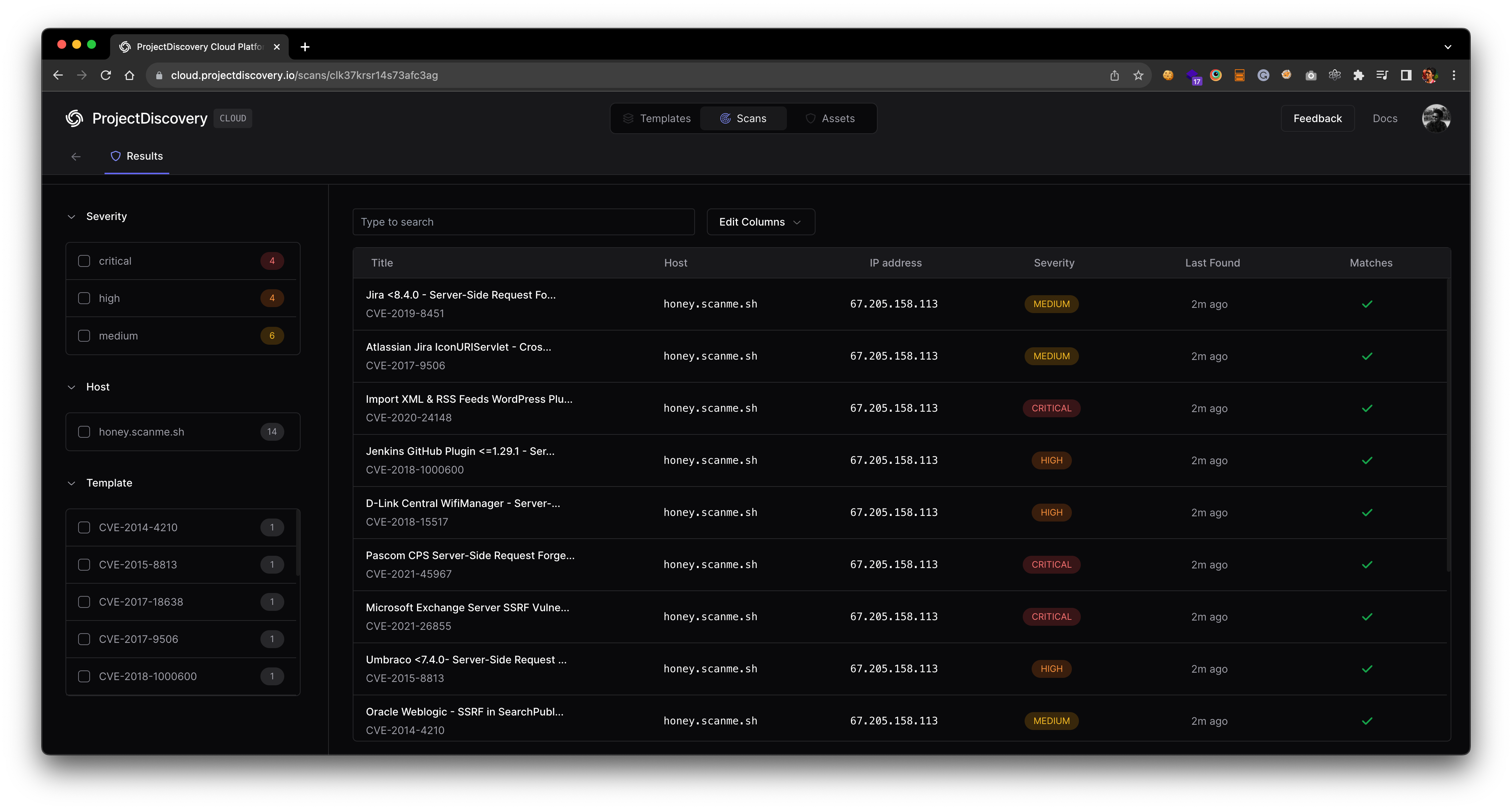
After the scan, a URL will be displayed on the command line interface. Visit this URL to check your results on the Cloud Dashboard.
2. Use the `nuclei -auth` command, enter your API key when prompted.
3. To perform a scan and upload the results straight to the cloud, use the `-cloud-upload` option while running a nuclei scan.
An example command might look like:
```bash
nuclei -target http://honey.scanme.sh -cloud-upload
```
And the output would be:
```console
__ _
____ __ _______/ /__ (_)
/ __ \/ / / / ___/ / _ \/ /
/ / / / /_/ / /__/ / __/ /
/_/ /_/\__,_/\___/_/\___/_/ v3.1.0
projectdiscovery.io
[INF] Current nuclei version: v3.1.0 (latest)
[INF] Current nuclei-templates version: v9.6.9 (latest)
[INF] To view results on cloud dashboard, visit https://cloud.projectdiscovery.io/scans upon scan completion.
[INF] New templates added in latest release: 73
[INF] Templates loaded for current scan: 71
[INF] Executing 71 signed templates from projectdiscovery/nuclei-templates
[INF] Targets loaded for current scan: 1
[INF] Using Interactsh Server: oast.live
[CVE-2017-9506] [http] [medium] http://honey.scanme.sh/plugins/servlet/oauth/users/icon-uri?consumerUri=http://clk37fcdiuf176s376hgjzo3xsoq5bdad.oast.live
[CVE-2019-9978] [http] [medium] http://honey.scanme.sh/wp-admin/admin-post.php?swp_debug=load_options&swp_url=http://clk37fcdiuf176s376hgyk9ppdqe9a83z.oast.live
[CVE-2019-8451] [http] [medium] http://honey.scanme.sh/plugins/servlet/gadgets/makeRequest
[CVE-2015-8813] [http] [high] http://honey.scanme.sh/Umbraco/feedproxy.aspx?url=http://clk37fcdiuf176s376hgj885caqoc713k.oast.live
[CVE-2020-24148] [http] [critical] http://honey.scanme.sh/wp-admin/admin-ajax.php?action=moove_read_xml
[CVE-2020-5775] [http] [medium] http://honey.scanme.sh/external_content/retrieve/oembed?endpoint=http://clk37fcdiuf176s376hgyyxa48ih7jep5.oast.live&url=foo
[CVE-2020-7796] [http] [critical] http://honey.scanme.sh/zimlet/com_zimbra_webex/httpPost.jsp?companyId=http://clk37fcdiuf176s376hgi9b8sd33se5sr.oast.live%23
[CVE-2017-18638] [http] [high] http://honey.scanme.sh/composer/send_email?to=hVsp@XOvw&url=http://clk37fcdiuf176s376hgyf8y81i9oju3e.oast.live
[CVE-2018-15517] [http] [high] http://honey.scanme.sh/index.php/System/MailConnect/host/clk37fcdiuf176s376hgi5j3fsht3dchj.oast.live/port/80/secure/
[CVE-2021-45967] [http] [critical] http://honey.scanme.sh/services/pluginscript/..;/..;/..;/getFavicon?host=clk37fcdiuf176s376hgh1y3xjzb3yjpy.oast.live
[CVE-2021-26855] [http] [critical] http://honey.scanme.sh/owa/auth/x.js
[INF] Scan results uploaded! View them at https://cloud.projectdiscovery.io/scans/clk37krsr14s73afc3ag
```
After the scan, a URL will be displayed on the command line interface. Visit this URL to check your results on the Cloud Dashboard.
 ### Advanced Integration Options
**Setting API key via environment variable**
Avoid entering your API key via interactive prompt by setting it via environment variable.
```sh
export PDCP_API_KEY=XXXX-XXXX
```
**Enabling result upload by default**
If you want all your scans to automatically upload results to the cloud, enable the `ENABLE_CLOUD_UPLOAD` environment variable.
```sh
export ENABLE_CLOUD_UPLOAD=true
```
**Disabling cloud upload warnings**
To suppress warnings about result uploads, disable the `DISABLE_CLOUD_UPLOAD_WRN` environment variable.
```sh
export DISABLE_CLOUD_UPLOAD_WRN=true
```
Your configured PDCP API key stored in `$HOME/.pdcp/credentials.yaml`
Nuclei OSS results uploaded to the cloud platform are scheduled for automatic cleanup after 30 days, although this duration is subject to change as we gauge user feedback and requirement.
### Advanced Integration Options
**Setting API key via environment variable**
Avoid entering your API key via interactive prompt by setting it via environment variable.
```sh
export PDCP_API_KEY=XXXX-XXXX
```
**Enabling result upload by default**
If you want all your scans to automatically upload results to the cloud, enable the `ENABLE_CLOUD_UPLOAD` environment variable.
```sh
export ENABLE_CLOUD_UPLOAD=true
```
**Disabling cloud upload warnings**
To suppress warnings about result uploads, disable the `DISABLE_CLOUD_UPLOAD_WRN` environment variable.
```sh
export DISABLE_CLOUD_UPLOAD_WRN=true
```
Your configured PDCP API key stored in `$HOME/.pdcp/credentials.yaml`
Nuclei OSS results uploaded to the cloud platform are scheduled for automatic cleanup after 30 days, although this duration is subject to change as we gauge user feedback and requirement.